

Equifax business credit reports: What’s included and how to use them

Written byGerri Detweiler

Reviewed by Robin Saks Frankel

Summary
- The information in your Equifax® business credit report may affect whether you can get small business loans, vendor net terms, equipment leases, and other financing, as well as how much you’ll pay for it.
- Equifax creates several business credit scores with different score ranges, each designed to predict a specific type of risk.
- Learn what’s included in an Equifax business credit report and understand score ranges.
- Find out how to get your Equifax business credit report and build strong credit.
You have probably heard of the credit bureau Equifax if you’ve checked your personal credit reports or scores. But did you know it also offers small business credit reports and scores?
If you've tried to get a small business loan, open a net-30 account with a supplier, or lease equipment, your Equifax business credit report may have been part of the decision.
This guide explains what can be included in an Equifax business credit report, how it's used in real-world decisions, how to access your information, and what you can do to help improve your business credit scores.
If you do one thing after reading this guide, get your business credit reports and review them to make sure the information is accurate. Then make sure you get accounts (tradelines) that report to business credit, and pay on time to help establish a strong credit profile.
Quick answer: What is an Equifax business credit report?
An Equifax business credit report shows your company's credit history, as well as some financial information about your business. The information in this report is kept separate from your personal credit data with Equifax. Lenders, suppliers, insurance companies, and other businesses can review it when deciding whether to do business with your company.
Equifax is one of the three major business credit bureaus, along with Experian and Dun & Bradstreet (D&B). Their reports help companies assess the risk of extending credit or services to your business.
It's important to understand that this is entirely separate from your personal credit report. A business credit report reflects your company's credit history as a legal entity. While some Equifax scoring models can blend personal and business data to create a single score, the underlying business report itself lives in a separate commercial credit system.
There are two common reasons you may review an Equifax business credit report. You want to:
- Understand your own credit file before applying for financing or vendor terms, or
- Check on another business before extending credit or entering a partnership.
Here’s what the report covers and why it matters.
What it includes | Company identity, credit history, payment behavior, public records, and credit scores for a business |
Who may use it | Lenders, suppliers, insurers, landlords, equipment lessors, and potential business partners |
What it can impact | Loan approvals, vendor net terms, equipment leasing, business insurance underwriting, contract eligibility, and partnership decisions |
Where data comes from | Lenders, vendors, suppliers, and public court and government records that report to Equifax or the SBFE network |
How to access | Purchase through Nav Prime for business and personal credit in one dashboard, or at the Equifax website through eCredable (an approved Equifax reseller) |
Fastest potential improvements | Pay on time every month, add one or more reporting tradelines, and confirm your business identity info is accurate and consistent |
What is an Equifax business credit report used for?
Businesses aren’t likely to pull your credit report out of curiosity. After all, they cost money to buy. There's likely a decision to be made that involves the use of credit data.
Here are some of the most common decision points where your Equifax business credit report may be used:
- Loan and credit applications: Banks, credit unions, and alternative lenders may review your business credit report when you apply for a term loan, SBA loan, line of credit, or some business credit cards.
- Vendor net terms: Suppliers who offer net-30, net-60, or net-90 payment terms may check your business credit profile to decide whether to extend trade credit — and for how much.
- Equipment leasing: Lessors can pull business credit reports to assess whether your business is likely to meet monthly payment obligations.
- Business insurance underwriting: Some commercial insurers factor in business credit data when determining premiums or eligibility.
- Contract bidding: Government agencies and large enterprises may use credit checks as part of vetting potential contractors or vendors.
- Partnership vetting: If another company is considering you as a supplier, distributor, or strategic partner, they may pull a commercial credit report to evaluate your financial stability before signing an agreement.
What lenders look for
When a lender or supplier pulls your Equifax business credit report, they're typically scanning for four things before diving into the details:
- Recent payment behavior (especially any accounts past due)
- Public record filings like judgments or liens
- Total credit exposure relative to the business size, and
- Whether your business identity information is consistent and verifiable
Anything that raises a red flag in one of these areas can either result in closer scrutiny or even a rejection of the application.
What’s in an Equifax business credit report?
Most Equifax business credit reports are purchased by companies that want to reduce risk when doing business with another business. Here are the main parts that are included when they buy your report:
What’s included in an Equifax business credit report | |
Data | Description |
Company profile and background information | Business name, address, phone, tax ID, industry codes, principals, years in business, and employee count |
Tradelines and payment history | Details on business loans, credit cards, lines of credit, and trade accounts with payment patterns |
Public records | Bankruptcies, liens, judgments, UCC filings, and business registration details |
Credit inquiries | Companies have requested your credit report |
Credit scores and risk ratings | Numerical scores to predict the likelihood of paying on time or experiencing financial difficulty |
Company information
This section includes details such as business name and DBAs (doing business as), addresses, tax ID/EIN, business structure (corporation or LLC) and when it was established, number of employees, and industry codes (SIC and/or NAICS codes).
An Equifax identification number (EFX ID) will also be listed. This is a nine-digit number created by Equifax and used to track the business.
Lenders often cross-reference the details in this section against what you submitted on your loan application. If your legal name, address, or EIN differs from what's in the report — even slightly — it can create friction or suggest a mismatched file. Before you apply for any financing, verify that this section matches your Secretary of State filing, your bank account, and your credit application.
Tradelines and payment information
This section of your report is very important, especially when it comes to credit applications. It can also directly impact your business credit scores.
Tradelines
Tradelines are your active credit relationships — the loans, credit cards, lines of credit, and vendor accounts your business has now, or has opened in the past. Equifax can report tradelines for up to 24 months, whether positive or negative.
There are two main types of tradelines. Financial accounts include loans, credit cards, lines of credit, leases, and other credit extended by financial institutions. Non-financial trade accounts include vendor and supplier relationships — a net-30 account with an office supply company, for example.
For each tradeline, the report may show the account type and industry of the creditor, current status, balance and amount past due, high credit or credit limit, payment terms, date reported, date opened, and aging categories showing how much is slow 1–30 days, 31–60 days, and so on. The report also includes a 60-month payment history grid showing payment performance codes for each month.
If you're paying a vendor on time every month but nothing appears in this section, that vendor isn't reporting to Equifax. You may want to look for vendors and suppliers who specifically report to Equifax or the SBFE network.
Payment behavior signals
This is the single most important section of your Equifax business credit report. Two metrics summarize your payment behavior at a glance: days beyond terms (DBT) and the Payment Index.
Days beyond terms (DBT) measures how many days after the due date you pay accounts. If your terms with a vendor are net-30, for example, and you consistently pay on day 34, that account will show a 4 DBT. Equifax can display your average DBT alongside the industry average and national average, so a lender or partner can quickly see how your payment behavior compares.
When you review your Equifax business credit report, you’ll see a section that shows how quickly — or slowly — you’ve been paying your bills over the past 12 months. Specifically, it tracks the average number of days past due on your non-financial accounts (like vendors, suppliers, or service providers)
The Equifax Payment Index™ translates payment timing into a score of 1 – 100 based on your most recent non-financial payments, giving more weight to larger payments. A score of 90 or above means you're paying as agreed. Anything below 80 starts to indicate past-due patterns.
Payment Index | Days Past Due |
90+ | Pays as agreed |
80–89 | 1–30 days past due |
60–79 | 31–60 days past due |
40–59 | 61–90 days past due |
20–39 | 91–120 |
1–19 | 121+ days past due |
Source: Equifax® Business Credit Industry Report Plus 2.0 Training Guide
Public records
A public record is information that is recorded by a public agency. On your Equifax business credit report, this section can include bankruptcies, judgments, and tax liens. Equifax also includes Secretary of State registration information such as your incorporation date, incorporation status, and registered contact.
One important note: Unlike other commercial credit bureaus, Equifax does not report UCC filings (Uniform Commercial Code filings) in business credit reports, even though UCC filings are part of the public record.
That means public record information in an Equifax business credit report will likely be viewed as negative.
Inquiries
Inquiries are created when a company requests a copy of the credit report. Equifax does not factor inquiries into its risk score calculations. Unlike consumer credit where too many hard inquiries can lower your score, business credit report pulls at Equifax don't directly affect your scores.
Equifax does not include the names of companies that pulled your report, so it can be hard to trace specific inquiries back to specific applications. If you track your applications, you can mentally match inquiry dates to known activity to help you spot unauthorized pulls or unusual activity.
Equifax business credit scores you may see
Equifax doesn't produce one single business credit score. It produces several, each designed to predict a different type of risk. Customers who purchase these reports will work with Equifax to decide which reports and scores to purchase.
Why is there more than one Equifax business score?
Different financial decisions carry different risks. A vendor extending net-30 terms is worried about whether you'll pay the invoice on time. A bank issuing a five-year term loan is more concerned about whether your business might fail before the loan is repaid. An equipment lessor cares about whether you'll keep making monthly payments without going severely delinquent. Each of these risk questions can involve a different scoring model.
Equifax builds scores for each of these use cases using different data inputs, time horizons, and outcome definitions. Some scores use only commercial data.
Others, referred to as blended scores, can use both personal credit information from the business owner(s) or guarantor(s) as well as business credit information. The ability to blend consumer and commercial data is one of Equifax's defining capabilities in the small business credit space.
Note: A score of 0 on any Equifax scoring model indicates a formal commercial bankruptcy on file. This is separate from a low score, and usually triggers a manual review process.
Score cheat sheet by goal
The table below shows the scores most commonly associated with Equifax business credit reports, including scores available through Nav*.
Score | What it predicts | Score range | Key inputs | Available via Nav* |
Equifax® OneScore for Commercial | Likelihood a financial account will become severely delinquent (91+ DPD), including major derogatory events and bankruptcies, within 12 or 24 months of account origination | 300 – 660 | Financial and non-financial trades, public records, firmographics, trended data, consumer blended data [S4] | Yes |
Equifax Business Delinquency Score® for Others (a.k.a. Equifax Business Delinquency Score) | Likelihood of severe delinquency (91+ DPD), charge-off, or bankruptcy within the next 12 months to non-financial credit grantors | 101 – 662 | Commercial trades, public records, firmographics | Yes |
Commercial Insight™ Delinquency Score | Likelihood of financial trade accounts becoming severely delinquent (91+ DPD or worse) within 12 months of account origination to a financial creditor | 397 – 695 (total blended) | Commercial and consumer blended (also available as commercial-only or consumer-only) | Yes |
Business Delinquency Financial Score™ | Likelihood of severe delinquency, charge-off, or bankruptcy on financial services accounts | 101 – 715 | Financial accounts, public records | No |
Business Failure Risk Score™ | Likelihood of business failure through formal or informal bankruptcy within 12 months | 1000 – 1604 | Full file — payment history, public records, firmographics | No |
Business Failure Risk Class™ | Condensed risk grouping based on the Business Failure Risk Score | 1 – 5 (1 = lowest risk) | Derived from Business Failure Risk Score | No |
Unless otherwise noted, a higher score equals lower risk.
Not all scores may be available on all Nav plans.
Equifax also offers scoring solutions that can help lenders determine credit limits. These include suggested credit limits for suppliers, credit card issuers, or those offering loans. Equifax does not set credit limits, though; these tools are designed to be used as guidelines by lenders who will decide themselves the credit limit to set.
How are Equifax business credit scores calculated?
It helps to know what impacts your score so you know what to focus on. Equifax uses several factors to calculate your business credit scores — with payment history being the most significant. Understanding these factors helps you focus your efforts on what matters most for building and keeping strong credit.
Top factor: payment history
Your track record of paying bills on time carries the heaviest weight in Equifax scoring models. Depending on the scoring model and data available, this can include:
- Days beyond terms on trade accounts with suppliers and vendors
- Payment patterns on business credit cards and loans
- Whether you pay within agreed terms (like net-30)
- Consistency of on-time payments over the past 12 to 24 months
- Whether you've had accounts charged-off or put into collection status
This means the single most effective thing you can do to build strong Equifax scores is simple in concept and sometimes hard in practice: Pay every account on time, every time.
Operationally, you may want to set up autopay for any account where the payment amount is predictable, making sure you review invoices on a regular routine, and build a buffer into your cash flow so that a slow week of revenue doesn't result in a late payment to a vendor.
Collection accounts
Note that Equifax does not report collection data from third parties, like collection agencies. However, a creditor can note the status of an account as in “in collection” and it would be considered negative.
Credit utilization and high balances
How much of your available credit you're using may affect your scores. High balances relative to credit limits can signal financial stress, while keeping balances low demonstrates good credit management.
There’s a twist here though: Many lenders that report to business credit don’t report credit limits. In that case, the scoring model may substitute a recent high balance for this information.
Using credit isn’t necessarily bad for your credit scores but if credit utilization is bringing down your scores, you may want to consider making additional payments throughout the month to keep your reported balances down.
Public records and negative information
Public records include information available from the courts. Negative public filings can significantly damage your scores. On an Equifax business credit report, this may include:
If a negative public record appears on your report, the most important first step is to confirm it actually belongs to your business. False matches — records from businesses with similar names or addresses that are mistakenly attributed to your file — can occur.
If the record is yours and it's accurate, prioritize resolving it as quickly as possible: you may want to pay the lien or satisfy the judgment, for example. Once resolved, follow up to make sure the updated status is reflected in your Equifax file.
File depth, age, and account mix
Longer credit histories and more established relationships with creditors typically translate to higher scores. New businesses often start with lower scores not because of anything they've done wrong, but simply because there isn't enough data for the model to make a confident prediction. A thin file — having fewer than five reporting tradelines — can be a common reason a small business has a poor credit score even with a clean payment record.
Account mix can also affect certain credit scores. Having a variety of credit types — vendor accounts, business credit cards, and financial accounts like term loans — may positively impact credit scores. This doesn't mean you should open accounts you don't need, but it does mean that deliberately adding one or two reporting tradelines can make a meaningful difference for a business with a thin file.
Industry and business classification
Equifax can consider your business type/industry when calculating scores. Some industries may be viewed as higher risk due to economic volatility, seasonal fluctuations, or regulatory challenges.
The specific weight given to each factor varies by scoring model, but you can safely assume that payment history is the top factor no matter which credit scoring model a lender purchases.
How do I get my Equifax business credit report?
There are a couple of ways you can access your Equifax business credit reports.
You can go directly to Equifax and request a credit report on your own business (you can also request credit reports on other businesses) for a fee. Currently Equifax sells business credit reports through eCredable, an authorized reseller. Business owners can purchase a Business Credit Industry Report Plus™ 2.0 plus two credit scores — Equifax OneScore for Commercial and Equifax Business Failure Score — for $49.95.
With Nav Prime, you can purchase detailed credit reports and scores* from multiple business credit bureaus, including business and personal credit reports from Equifax, for less than if you purchased the reports individually from all the credit bureaus.
Using Nav can help you understand what information companies are reporting about your business, as well as view both business and personal credit in one spot.
In your Nav Credit Health dashboard, you can see trends in your credit, key factors having the most impact on your scores, and what to focus on next.
You’ll also get details on public records, including UCC filings, that can directly and indirectly impact financing or other opportunities.
Read: How to check business credit scores and reports
Can you get an Equifax report on another business?
There may be times when you want to check credit on other businesses. For example, you:
- Offer goods or services without getting paid in full upfront
- Want to vet a potential supplier or subcontractor
- Are considering acquiring another business
Just like a company that checks credit on your business, you can look at payment history, debts, and public record information such as tax liens or bankruptcy. The goal here is often twofold:
- Are there any problems that could indicate this company is risky to do business with?
- Does the information you have about their business match up with what the credit report says?
How often should you check and when do changes show up?
Credit reports change whenever new information is reported to the credit bureau. Creditors and suppliers don’t always report on the same schedule — some report monthly, others less frequently. When an update is submitted, it typically takes 24 – 72 hours for Equifax to process and reflect it.
Public records from courts and government agencies are updated on varying schedules since that information must be retrieved from courthouse systems around the country.
For many business owners, it’s a good idea to get into the habit of checking your credit reports and scores each month. This helps you monitor your progress, and can also alert you to changes, including suspicious activity that could indicate possible fraud.
How to read your Equifax report like a lender
When a lender or supplier pulls your Equifax business credit report, often they're scanning for patterns that either confirm what they know about your business (usually from your application) or for information that raises concerns.
Here's how you may want to approach reading the Equifax credit report you’ll get through Nav.
Business information
Confirm the company profile section is accurate. This is critically important for two reasons:
- Discrepancies between what you state on an application and what appears on the credit profile may raise potential fraud concerns that could slow down approval, or even result in a rejection for credit.
- Business profiles sometimes get mixed up with those of other businesses. This can lead to incorrect or missing information on your credit report. If the data is wrong, credit scores calculated from that information may not be accurate either.
Information in this section may include:
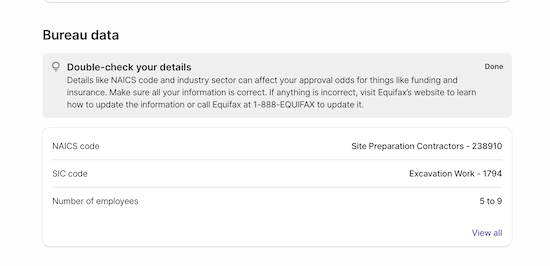
- Industry codes (NAICS and SIC codes)
- Number of employees
- Legal business name
- Equifax ID
- Business type
- Business address
- Phone numbers
- Website URL
- Years in business
- State of incorporation
- Key personnel
On the credit report you get through Nav, you’ll find a summary of key company information under the section titled Bureau data:
Review key factors
Scan for the factors that may impact your credit reports the most. This can include the most severe status listed across your accounts, any new delinquencies or charge-offs in the past 90 days, any bankruptcies, active judgments, or liens in the public records summary, and significant changes in total past-due amounts.
With Nav you’ll see a section that recommends factors to focus on:
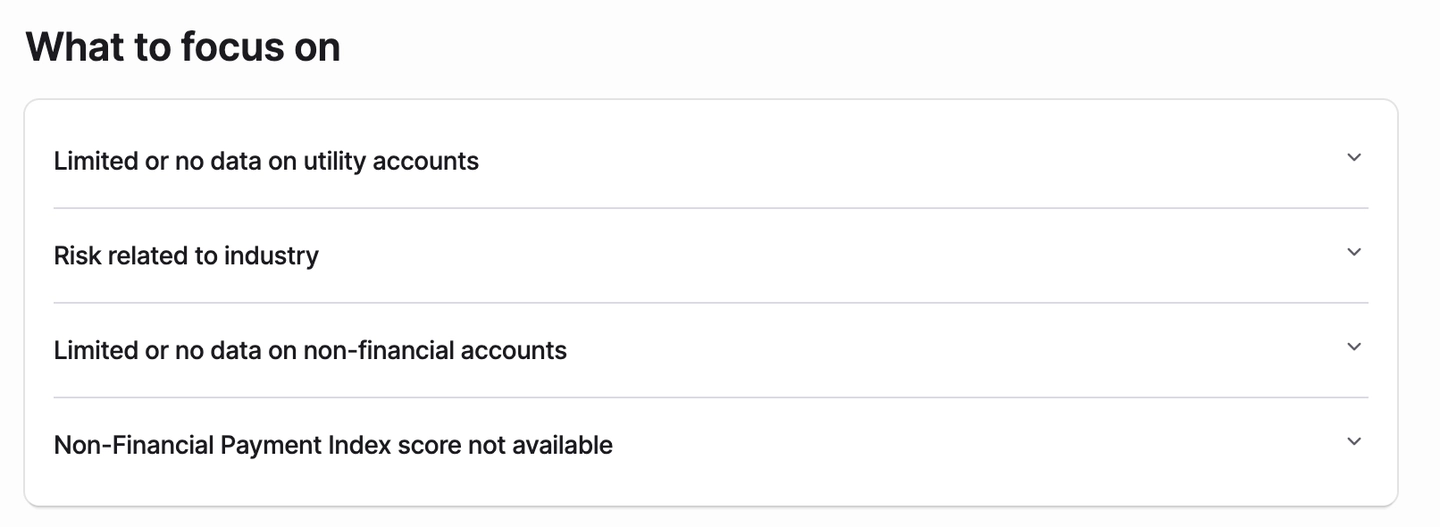
Carefully evaluate each factor in more detail, and decide which you may be able to improve. In the example above, one of the reasons given is:
Limited or no data on utility accounts
There's a lack of data about your utility accounts (e.g., electricity or internet). A lack of this data creates gaps in your credit profile, potentially lowering your score. Confirm that utility providers report your payment history to credit bureaus.
If you work from a home office, you may not be able to get a utility bill in the name of your business. In that case, you may want to look at another factor.
Another reason listed is:
Limited or no data on non-financial accounts
Equifax has limited or no data about your non-financial accounts (e.g., vendors or suppliers). Without sufficient data, your creditworthiness is harder to assess, which often results in a lower score. Establish tradelines with vendors that report to business credit bureaus.
For this factor could consider getting tradelines through vendors that report to Equifax business credit and pay on time to help build a credit history.
Here are the key sections you’ll see listed:
Active tradelines
Tradelines are one of the most important factors when it comes to building business credit. Without active tradelines, you will likely have a low credit score since there isn’t enough information for the scoring model to evaluate.
An active tradeline is a business credit account (like a vendor account, line of credit, or loan) you’re currently using.
Equifax reports accounts (tradelines) for up to 24 months, whether negative or not.
Here you’ll see:
- Type of account (category)
- Current balance
- DBT (days beyond terms)
- Balance owed
Public filings
Public filings are any business records available to the public, including bankruptcies, liens, or collections. Review this section carefully to make sure any information reported is correct and belongs to your business. Equifax does not report UCC filings.
If you don’t see any information in this category, it means Equifax doesn’t have information about public filings for your business.
Balances with terms
Balances within terms are outstanding amounts you owe that are within the payment schedule or due date (meaning not overdue). Accounts paid on time can be helpful for establishing a strong credit history.
Create a one-page lender summary
Once you've read your report, make notes about what you’ve learned and what you want to improve.
Section | What to document |
Strengths | On-time payment history (months with 0 DBT), established tradelines, no public records, consistent business identity across report |
Concerns | Any delinquent accounts, public record filings, thin-file indicators, high credit utilization, or mismatched identity fields |
Fixes underway | Active disputes filed (with dates), new tradelines opened, payment plans or lien releases in process |
Documentation list | Secretary of State filing, EIN letter, 3 – 6 months of bank statements, proof of on-time payments, any lien release letters |
How to improve what’s on your Equifax business credit report
Whether you're starting from scratch or looking to boost an existing score, these strategies may help you build a stronger business credit profile.
1. Add reporting tradelines intentionally
Many businesses have thin files because they don't have enough accounts reporting to credit bureaus. Build your credit profile by adding:
- Net-30 supplier accounts that report to Equifax
- Business credit cards that report
- Credit builder accounts
2. Build a payment system that prevents late payments
Paying on time is the single most effective action you can take to build better credit. There are times when you will get so busy running your business that even paying a bill may feel like a lower priority. Try to set up systems to support on-time payments. For example, you may want to:
- Set autopay for any account where the payment amount is fixed and predictable (like a loan or credit card minimum payment).
- Create a weekly invoice review routine — 15 minutes every Monday to check what's due that week and what's coming due the following week.
- Build a calendar buffer: if something is due on the 30th, consider scheduling the payment for the 25th.
3. Keep credit exposure manageable
High balances relative to limits may signal financial stress in Equifax's scoring models. There are two practical approaches you can use to help keep your reported utilization lower.
- Make payments more frequently than once a month on revolving accounts. If you're using a credit card heavily during the month, you may want to pay it down mid-cycle before the statement closes lowers the balance that gets reported.
- When you're planning a large purchase, consider whether the timing aligns with your reporting cycle — spreading large purchases across two billing periods may avoid a one-month utilization spike, for example.
4. Improve your profile over time
If your business doesn’t have much credit history, understand it will take time to build your credit profile. Scoring models tend to reward consistency over time, not speed. That means it can be helpful to build credit before you need it.
Be careful about applying for multiple credit accounts at once. While Equifax doesn't penalize inquiries in its score calculations, lenders may notice multiple lender applications in a short period of time, and may flag that as risk.
5. Address public record issues proactively
If a lien, judgment, or collection appears in your report, confirm it's actually yours before doing anything else. If it's accurate: decide how you can or will resolve it. You may need to pay or settle a tax lien, for example. With a bankruptcy, you can only confirm the information is accurate. If it is, then you’ll need to focus on building new credit references that you pay on time.
6. Build a 30-60-90 day improvement plan
Here’s an example of how you might tackle building credit over the next few months. Keep in mind that your steps may vary depending on what’s affecting your business credit scores.
Timeline | Priority action | What to gather | Expected lag | How to track |
Days 1 – 30 | Get your Equifax report; verify all business identity fields; flag any errors or mismatched info | EIN docs, Secretary of State filing, business bank statement showing legal name | Corrections can take 30 days once a dispute is filed | Screenshot or save the baseline report date |
Days 31 – 60 | Open 1 – 2 vendor tradelines that report to Equifax; set up autopay or calendar reminders for all existing accounts | Vendor account confirmation that they report to Equifax or SBFE | Tradeline data can take 30 – 60 days to appear after a reporting cycle | Pull report monthly to check for new tradeline appearances |
Days 61 – 90 | Review updated report for DBT improvement, new tradelines, and score changes; resolve any outstanding public record issues | Payment receipts, lien release documents, satisfaction letters | Score changes typically reflect prior-cycle data; expect 30 – 90-day lags | Compare this report to your Day 1 baseline; note score changes and new tradelines |
Finding and correcting errors on Equifax business credit reports
Business credit reports may contain mistakes. Information comes from a variety of sources including courthouses and suppliers, and it’s possible for errors to occur.
Here's a process for catching and correcting them.
Equifax | Experian | Dun & Bradstreet | |
Primary identifier | EFX ID® — a unique 9-digit number assigned by Equifax | Experian Business Identification Number (BIN) a unique 9-digit number assigned by Experian | D-U-N-S® Number — a unique 9-digit identifier assigned by Dun & Bradstreet |
What it emphasizes | Strong financial tradeline data (via Commercial Financial Network), blended consumer/commercial scoring, and deep payment trend analysis | Broad tradeline depth, UCC filings, Small Business Credit Share data, and collections information | Extensive supplier trade data from global network; includes lawsuits; corporate family-tree linkage |
Typical report components | Company profile, financial and non-financial tradelines, public records (bankruptcies, liens, judgments), DBT, Payment Index, credit scores | Business profile, payment trends, trade detail, UCC filings, public records, collections, Intelliscore Plus score | Company profile, PAYDEX® score, delinquency and failure predictors, public records, trade payment history, corporate hierarchy |
Key score types | OneScore for Commercial, Business Delinquency Score, Commercial Insight Delinquency Score, Business Failure Risk Score | Intelliscore Plus℠ (1 – 100), Financial Stability Risk Rating, | PAYDEX® (1 – 100), Delinquency Predictor Score (101 – 670), D&B Failure Score (1 – 5), SER Rating (1 – 9) |
Best known for | Blended consumer + commercial scoring; strong for lenders evaluating small businesses with thin files | Breadth of U.S. business coverage; widely used for vendor net-terms and SBFE-member lenders | Supplier due diligence, government contracts, and enterprise procurement decisions |
How to access (as owner) | Purchase through Nav Prime or via eCredable (approved Equifax reseller) | Purchase via Nav Prime or directly at smallbusiness.experian.com | Purchase via Nav Prime or directly through dnb.com |
The bottom line
Your Equifax business credit report can be an important source of credit and business information for lenders, vendors, insurers, and potential partners. If you haven’t seen yours, you may miss out on financing and other opportunities without even knowing that.
The good news: you can actually do something about it. Get your report and verify your business identity information. Then focus on building credit references with companies that report, and paying on time. Those two actions, done consistently over time, can help you establish a strong business credit rating.
With a Nav Prime membership, you can monitor information in your Equifax business credit report along with other credit data in one dashboard, and then leverage that information to help get financing and to grow your business.